
 MyBatis源码剖析-二级缓存
# 1. 二级缓存回顾
MyBatis 默认不开启二级缓存。与一级缓存不同,二级缓存和具体的命名空间绑定,一个Mapper中有一个Cache,相同Mapper中的MappedStatement共用一个Cache,一级缓存则是和 SqlSession 绑定。
二级缓存构建在一级缓存之上,在收到查询请求时,MyBatis 首先会查询二级缓存,若二级缓存未命中,再去查询一级缓存,一级缓存没有,再查询数据库。
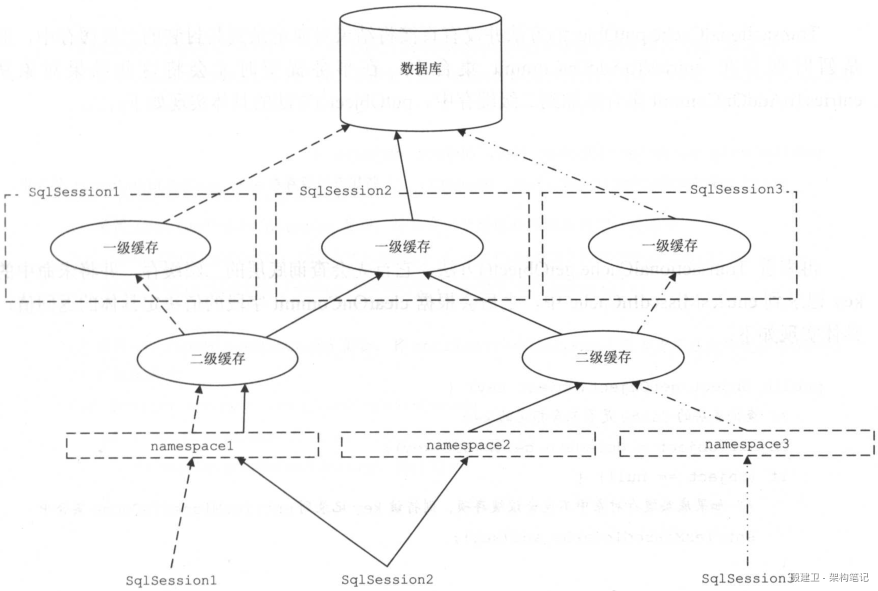
二级缓存的开启需要进行配置,实现二级缓存的时候,MyBatis 要求返回的 POJO 必须是可序列化的,也就是要求实现 Serializable 接口。
启用二级缓存分为三步:
- 开启全局二级缓存配置;
<settings>
    <setting name="cacheEnabled" value="true"/>
</settings>
2
3
- 在需要使用二级缓存的Mapper配置文件中配置标签
<cache></cache>
- 在具体CURD标签上配置 useCache=true
  <select id="findById" resultType="com.lagou.pojo.User" useCache="true">
      select * from user where id = #{id}
  </select>
2
3
接下来我们通用源码分析mybatis二级缓存机制。
# 2. 二级缓存源码剖析
# 2.1 加载二级缓存配置
根据之前的mybatis源码剖析,核心配置文件的解析工作主要交给XMLConfigBuilder.parseConfiguration()方法来实现。
我们首先来看cacheEnabled属性的解析:
protected boolean cacheEnabled = true;
private void settingsElement(Properties props) throws Exception {
    ...
    configuration.setCacheEnabled(booleanValueOf(props.getProperty("cacheEnabled"), true));
    ...
}
public void setCacheEnabled(boolean cacheEnabled) {
    this.cacheEnabled = cacheEnabled;
}
2
3
4
5
6
7
8
9
可以看出二级缓存的总开关,默认是开启状态的。
获取cacheEnabled属性值之后,总归是要用的,搜索源码发现在创建 Executor 对象时用到了这个属性:
public Executor newExecutor(Transaction transaction, ExecutorType executorType) {
    // 获得执行器类型
    executorType = executorType == null ? defaultExecutorType : executorType; // 使用默认
    executorType = executorType == null ? ExecutorType.SIMPLE : executorType; // 使用 ExecutorType.SIMPLE
    // 创建对应实现的 Executor 对象
    Executor executor;
    if (ExecutorType.BATCH == executorType) {
        executor = new BatchExecutor(this, transaction);
    } else if (ExecutorType.REUSE == executorType) {
        executor = new ReuseExecutor(this, transaction);
    } else {
        executor = new SimpleExecutor(this, transaction);
    }
    // 如果开启缓存,创建 CachingExecutor 对象,进行包装
    if (cacheEnabled) {
        executor = new CachingExecutor(executor);
    }
    // 应用插件
    executor = (Executor) interceptorChain.pluginAll(executor);
    return executor;
}
2
3
4
5
6
7
8
9
10
11
12
13
14
15
16
17
18
19
20
21
从源码中不难发现,在开启二级缓存之后,mybatis会创建 CachingExecutor 对象,对 Executor 对象进行包装。这里使用了装饰器模式,因此后续我们分析源码时将从CachingExecutor类入手。
接下来是cache标签的解析,cache标签定义在Mapper.xml文件中,根据之前的mybatis源码剖析,这部分的解析工作XMLMapperBuilder.parse()方法进行解析:
public void parse() {
    // 判断当前 Mapper 是否已经加载过
    if (!configuration.isResourceLoaded(resource)) {
        // 解析 `<mapper />` 节点
        configurationElement(parser.evalNode("/mapper"));
        // 标记该 Mapper 已经加载过
        configuration.addLoadedResource(resource);
        // 绑定 Mapper
        bindMapperForNamespace();
    }

    // 解析待定的 <resultMap /> 节点
    parsePendingResultMaps();
    // 解析待定的 <cache-ref /> 节点
    parsePendingCacheRefs();
    // 解析待定的 SQL 语句的节点
    parsePendingStatements();
}

// 解析 `<mapper />` 节点
private void configurationElement(XNode context) {
    try {
        // 获得 namespace 属性
        String namespace = context.getStringAttribute("namespace");
        if (namespace == null || namespace.equals("")) {
            throw new BuilderException("Mapper's namespace cannot be empty");
        }
        // 设置 namespace 属性
        builderAssistant.setCurrentNamespace(namespace);
        // 解析 <cache-ref /> 节点
        cacheRefElement(context.evalNode("cache-ref"));
        // 解析 <cache /> 节点
        cacheElement(context.evalNode("cache"));
        // 已废弃!老式风格的参数映射。内联参数是首选,这个元素可能在将来被移除,这里不会记录。
        parameterMapElement(context.evalNodes("/mapper/parameterMap"));
        // 解析 <resultMap /> 节点们
        resultMapElements(context.evalNodes("/mapper/resultMap"));
        // 解析 <sql /> 节点们
        sqlElement(context.evalNodes("/mapper/sql"));
        // 解析 <select /> <insert /> <update /> <delete /> 节点们
        buildStatementFromContext(context.evalNodes("select|insert|update|delete"));
    } catch (Exception e) {
        throw new BuilderException("Error parsing Mapper XML. The XML location is '" + resource + "'. Cause: " + e, e);
    }
}

// 解析 <cache /> 标签
private void cacheElement(XNode context) throws Exception {
    if (context != null) {
        // 获得负责存储的 Cache 实现类
        String type = context.getStringAttribute("type", "PERPETUAL");
        Class<? extends Cache> typeClass = typeAliasRegistry.resolveAlias(type);
        // 获得负责过期的 Cache 实现类
        String eviction = context.getStringAttribute("eviction", "LRU");
        Class<? extends Cache> evictionClass = typeAliasRegistry.resolveAlias(eviction);
        // 获得 flushInterval、size、readWrite、blocking 属性
        Long flushInterval = context.getLongAttribute("flushInterval");
        Integer size = context.getIntAttribute("size");
        boolean readWrite = !context.getBooleanAttribute("readOnly", false);
        boolean blocking = context.getBooleanAttribute("blocking", false);
        // 获得 Properties 属性
        Properties props = context.getChildrenAsProperties();
        // 创建 Cache 对象
        builderAssistant.useNewCache(typeClass, evictionClass, flushInterval, size, readWrite, blocking, props);
    }
}
2
3
4
5
6
7
8
9
10
11
12
13
14
15
16
17
18
19
20
21
22
23
24
25
26
27
28
29
30
31
32
33
34
35
36
37
38
39
40
41
42
43
44
45
46
47
48
49
50
51
52
53
54
55
56
57
58
59
60
61
62
63
64
65
66
通过cacheElement方法解析获得配置的属性值之后我们来看看是如何构建Cache对象的:
/**
 * 创建 Cache 对象
 *
 * @param typeClass 负责存储的 Cache 实现类
 * @param evictionClass 负责过期的 Cache 实现类
 * @param flushInterval 清空缓存的频率。0 代表不清空
 * @param size 缓存容器大小
 * @param readWrite 是否序列化
 * @param blocking 是否阻塞
 * @param props Properties 对象
 * @return Cache 对象
 */
public Cache useNewCache(Class<? extends Cache> typeClass,
                         Class<? extends Cache> evictionClass,
                         Long flushInterval,
                         Integer size,
                         boolean readWrite,
                         boolean blocking,
                         Properties props) {
    // 创建 Cache 对象
    Cache cache = new CacheBuilder(currentNamespace)
            .implementation(valueOrDefault(typeClass, PerpetualCache.class))
            .addDecorator(valueOrDefault(evictionClass, LruCache.class))
            .clearInterval(flushInterval)
            .size(size)
            .readWrite(readWrite)
            .blocking(blocking)
            .properties(props)
            .build();
    // 添加到 configuration 的 caches 中
    configuration.addCache(cache);
    // 赋值给 currentCache
    currentCache = cache;
    return cache;
}
2
3
4
5
6
7
8
9
10
11
12
13
14
15
16
17
18
19
20
21
22
23
24
25
26
27
28
29
30
31
32
33
34
35
我们看到一个Mapper.xml只会解析一次标签,也就是只创建一次Cache对象,放进configuration中,并将cache赋值给MapperBuilderAssistant.currentCache。
buildStatementFromContext(context.evalNodes("select|insert|update|delete"));
将Cache包装到MappedStatement
// 解析 <select /> <insert /> <update /> <delete /> 节点们
private void buildStatementFromContext(List<XNode> list) {
    if (configuration.getDatabaseId() != null) {
        buildStatementFromContext(list, configuration.getDatabaseId());
    }
    buildStatementFromContext(list, null);
    // 上面两块代码,可以简写成 buildStatementFromContext(list, configuration.getDatabaseId());
}

private void buildStatementFromContext(List<XNode> list, String requiredDatabaseId) {
    //遍历 <select /> <insert /> <update /> <delete /> 节点们
    for (XNode context : list) {
        // 创建 XMLStatementBuilder 对象,执行解析
        final XMLStatementBuilder statementParser = new XMLStatementBuilder(configuration, builderAssistant, context, requiredDatabaseId);
        try {
            statementParser.parseStatementNode();
        } catch (IncompleteElementException e) {
            // 解析失败,添加到 configuration 中
            configuration.addIncompleteStatement(statementParser);
        }
    }
}
2
3
4
5
6
7
8
9
10
11
12
13
14
15
16
17
18
19
20
21
22
XMLStatementBuilder.parseStatementNode():
/**
 * 执行解析
 */
public void parseStatementNode() {
    // 获得 id 属性,编号。
    String id = context.getStringAttribute("id");
    // 获得 databaseId , 判断 databaseId 是否匹配
    String databaseId = context.getStringAttribute("databaseId");
    ...
    // 获得各种属性
    Integer fetchSize = context.getIntAttribute("fetchSize");
    Integer timeout = context.getIntAttribute("timeout");
    String parameterMap = context.getStringAttribute("parameterMap");
    String parameterType = context.getStringAttribute("parameterType");
    Class<?> parameterTypeClass = resolveClass(parameterType);
    String resultMap = context.getStringAttribute("resultMap");
    String resultType = context.getStringAttribute("resultType");
    String lang = context.getStringAttribute("lang");

    // 获得 lang 对应的 LanguageDriver 对象
    LanguageDriver langDriver = getLanguageDriver(lang);

    ...

    // 创建 MappedStatement 对象
    builderAssistant.addMappedStatement(id, sqlSource, statementType, sqlCommandType,
            fetchSize, timeout, parameterMap, parameterTypeClass, resultMap, resultTypeClass,
            resultSetTypeEnum, flushCache, useCache, resultOrdered,
            keyGenerator, keyProperty, keyColumn, databaseId, langDriver, resultSets);
}
2
3
4
5
6
7
8
9
10
11
12
13
14
15
16
17
18
19
20
21
22
23
24
25
26
27
28
29
30
MapperBuilderAssistant.addMappedStatement():
// 构建 MappedStatement 对象
public MappedStatement addMappedStatement(
        String id,
        SqlSource sqlSource,
        StatementType statementType,
        SqlCommandType sqlCommandType,
        Integer fetchSize,
        Integer timeout,
        String parameterMap,
        Class<?> parameterType,
        String resultMap,
        Class<?> resultType,
        ResultSetType resultSetType,
        boolean flushCache,
        boolean useCache,
        boolean resultOrdered,
        KeyGenerator keyGenerator,
        String keyProperty,
        String keyColumn,
        String databaseId,
        LanguageDriver lang,
        String resultSets) {

    // 如果只想的 Cache 未解析,抛出 IncompleteElementException 异常
    if (unresolvedCacheRef) {
        throw new IncompleteElementException("Cache-ref not yet resolved");
    }

    // 获得 id 编号,格式为 `${namespace}.${id}`
    id = applyCurrentNamespace(id, false);
    boolean isSelect = sqlCommandType == SqlCommandType.SELECT;

    // 创建 MappedStatement.Builder 对象
    MappedStatement.Builder statementBuilder = new MappedStatement.Builder(configuration, id, sqlSource, sqlCommandType)
            .resource(resource)
            .fetchSize(fetchSize)
            .timeout(timeout)
            .statementType(statementType)
            .keyGenerator(keyGenerator)
            .keyProperty(keyProperty)
            .keyColumn(keyColumn)
            .databaseId(databaseId)
            .lang(lang)
            .resultOrdered(resultOrdered)
            .resultSets(resultSets)
            .resultMaps(getStatementResultMaps(resultMap, resultType, id)) // 获得 ResultMap 集合
            .resultSetType(resultSetType)
            .flushCacheRequired(valueOrDefault(flushCache, !isSelect))
            .useCache(valueOrDefault(useCache, isSelect))
            .cache(currentCache);

    // 获得 ParameterMap ,并设置到 MappedStatement.Builder 中
    ParameterMap statementParameterMap = getStatementParameterMap(parameterMap, parameterType, id);
    if (statementParameterMap != null) {
        statementBuilder.parameterMap(statementParameterMap);
    }

    // 创建 MappedStatement 对象
    MappedStatement statement = statementBuilder.build();
    // 添加到 configuration 中
    configuration.addMappedStatement(statement);
    return statement;
}
2
3
4
5
6
7
8
9
10
11
12
13
14
15
16
17
18
19
20
21
22
23
24
25
26
27
28
29
30
31
32
33
34
35
36
37
38
39
40
41
42
43
44
45
46
47
48
49
50
51
52
53
54
55
56
57
58
59
60
61
62
63
我们看到将Mapper中创建的Cache对象,加入到了每个MappedStatement对象中,也就是同一个Mapper中所有的查询使用的是同一个缓存对象。
# 2.2 二级缓存工作原理
前面我们说到在启动二级缓存后,生成的Executor对象为CachingExecutor,要分析二级缓存的工作原理,我们首先从CachingExecutor.query方法开始分析:
public <E> List<E> query(MappedStatement ms, Object parameterObject, RowBounds rowBounds, ResultHandler resultHandler, CacheKey key, BoundSql boundSql)
        throws SQLException {
    Cache cache = ms.getCache();
    if (cache != null) {
        // 如果需要清空缓存,则进行清空
        flushCacheIfRequired(ms);
        if (ms.isUseCache() && resultHandler == null) {
            // 暂时忽略,存储过程相关
            ensureNoOutParams(ms, boundSql);
            @SuppressWarnings("unchecked")
            // 从二级缓存中,获取结果
            List<E> list = (List<E>) tcm.getObject(cache, key);
            if (list == null) {
                // 如果不存在,则从数据库中查询
                list = delegate.query(ms, parameterObject, rowBounds, resultHandler, key, boundSql);
                // 缓存结果到二级缓存中
                tcm.putObject(cache, key, list); // issue #578 and #116
            }
            // 如果存在,则直接返回结果
            return list;
        }
    }
    // 不使用缓存,则从数据库中查询
    return delegate.query(ms, parameterObject, rowBounds, resultHandler, key, boundSql);
}
2
3
4
5
6
7
8
9
10
11
12
13
14
15
16
17
18
19
20
21
22
23
24
25
如果设置了flushCache="true",则每次查询都会刷新缓存:
<!-- 执行此语句清空缓存 -->
<select id="findbyId" resultType="com.lagou.pojo.user" useCache="true" flushCache="true" >
    select * from t_demo
</select>
2
3
4
如上,注意二级缓存是从 MappedStatement 中获取的。由于 MappedStatement 存在于全局配置中,可以多个 CachingExecutor 获取到,这样就会出现线程安全问题。除此之外,若不加以控制,多个事务共用一个缓存实例,会导致脏读问题。至于脏读问题,需要借助其他类来处理,也就是上面代码中 tcm 变量对应的类型。下面分析一下:
TransactionalCacheManager
public class TransactionalCacheManager {

    /**
     * Cache 和 TransactionalCache 的映射
     */
    private final Map<Cache, TransactionalCache> transactionalCaches = new HashMap<>();

    /**
     * 清空缓存
     *
     * @param cache Cache 对象
     */
    public void clear(Cache cache) {
        getTransactionalCache(cache).clear();
    }

    /**
     * 获得缓存中,指定 Cache + K 的值。
     *
     * @param cache Cache 对象
     * @param key 键
     * @return 值
     */
    public Object getObject(Cache cache, CacheKey key) {
        // 首先,获得 Cache 对应的 TransactionalCache 对象
        // 然后从 TransactionalCache 对象中,获得 key 对应的值
        return getTransactionalCache(cache).getObject(key);
    }

    /**
     * 添加 Cache + KV ,到缓存中
     *
     * @param cache Cache 对象
     * @param key 键
     * @param value 值
     */
    public void putObject(Cache cache, CacheKey key, Object value) {
        // 首先,获得 Cache 对应的 TransactionalCache 对象
        // 然后,添加 KV 到 TransactionalCache 对象中
        getTransactionalCache(cache).putObject(key, value);
    }

    /**
     * 提交所有 TransactionalCache
     */
    public void commit() {
        for (TransactionalCache txCache : transactionalCaches.values()) {
            txCache.commit();
        }
    }

    /**
     * 回滚所有 TransactionalCache
     */
    public void rollback() {
        for (TransactionalCache txCache : transactionalCaches.values()) {
            txCache.rollback();
        }
    }

    /**
     * 获得 Cache 对应的 TransactionalCache 对象
     *
     * @param cache Cache 对象
     * @return TransactionalCache 对象
     */
    private TransactionalCache getTransactionalCache(Cache cache) {
        return transactionalCaches.computeIfAbsent(cache, TransactionalCache::new);
    }

}
2
3
4
5
6
7
8
9
10
11
12
13
14
15
16
17
18
19
20
21
22
23
24
25
26
27
28
29
30
31
32
33
34
35
36
37
38
39
40
41
42
43
44
45
46
47
48
49
50
51
52
53
54
55
56
57
58
59
60
61
62
63
64
65
66
67
68
69
70
71
TransactionalCacheManager 内部维护了 Cache 实例与 TransactionalCache 实例间的映射关系,该类也仅负责维护两者的映射关系,真正做事的还是 TransactionalCache。
TransactionalCache 是一种缓存装饰器,可以为 Cache 实例增加事务功能。我在之前提到的脏读问题正是由该类进行处理的。下面分析一下该类的逻辑:
public class TransactionalCache implements Cache {

    private static final Log log = LogFactory.getLog(TransactionalCache.class);

    /**
     * 委托的 Cache 对象。
     *
     * 实际上,就是二级缓存 Cache 对象。
     */
    private final Cache delegate;
    /**
     * 提交时,清空 {@link #delegate}
     *
     * 初始时,该值为 false
     * 清理后{@link #clear()} 时,该值为 true ,表示持续处于清空状态
     */
    private boolean clearOnCommit;
    /**
     * 待提交的 KV 映射
     */
    private final Map<Object, Object> entriesToAddOnCommit;
    /**
     * 查找不到的 KEY 集合
     */
    private final Set<Object> entriesMissedInCache;

    public TransactionalCache(Cache delegate) {
        this.delegate = delegate;
        this.clearOnCommit = false;
        this.entriesToAddOnCommit = new HashMap<>();
        this.entriesMissedInCache = new HashSet<>();
    }

    @Override
    public String getId() {
        return delegate.getId();
    }

    @Override
    public int getSize() {
        return delegate.getSize();
    }

    @Override
    public Object getObject(Object key) {
        // issue #116
        // 从 delegate 中获取 key 对应的 value
        Object object = delegate.getObject(key);
        // 如果不存在,则添加到 entriesMissedInCache 中
        if (object == null) {
            entriesMissedInCache.add(key);
        }
        // issue #146
        // 如果 clearOnCommit 为 true ,表示处于持续清空状态,则返回 null
        if (clearOnCommit) {
            return null;
        // 返回 value
        } else {
            return object;
        }
    }

    @Override
    public ReadWriteLock getReadWriteLock() {
        return null;
    }

    @Override
    public void putObject(Object key, Object object) {
        // 暂存 KV 到 entriesToAddOnCommit 中
        entriesToAddOnCommit.put(key, object);
    }

    @Override
    public Object removeObject(Object key) {
        return null;
    }

    @Override
    public void clear() {
        // 标记 clearOnCommit 为 true
        clearOnCommit = true;
        // 清空 entriesToAddOnCommit
        entriesToAddOnCommit.clear();
    }

    public void commit() {
        // 如果 clearOnCommit 为 true ,则清空 delegate 缓存
        if (clearOnCommit) {
            delegate.clear();
        }
        // 将 entriesToAddOnCommit、entriesMissedInCache 刷入 delegate 中
        flushPendingEntries();
        // 重置
        reset();
    }

    public void rollback() {
        // 从 delegate 移除出 entriesMissedInCache
        unlockMissedEntries();
        // 重置
        reset();
    }

    private void reset() {
        // 重置 clearOnCommit 为 false
        clearOnCommit = false;
        // 清空 entriesToAddOnCommit、entriesMissedInCache
        entriesToAddOnCommit.clear();
        entriesMissedInCache.clear();
    }

    /**
     * 将 entriesToAddOnCommit、entriesMissedInCache 刷入 delegate 中
     */
    private void flushPendingEntries() {
        // 将 entriesToAddOnCommit 刷入 delegate 中
        for (Map.Entry<Object, Object> entry : entriesToAddOnCommit.entrySet()) {
            delegate.putObject(entry.getKey(), entry.getValue());
        }
        // 将 entriesMissedInCache 刷入 delegate 中
        for (Object entry : entriesMissedInCache) {
            if (!entriesToAddOnCommit.containsKey(entry)) {
                delegate.putObject(entry, null);
            }
        }
    }

    private void unlockMissedEntries() {
        for (Object entry : entriesMissedInCache) {
            try {
                delegate.removeObject(entry);
            } catch (Exception e) {
                log.warn("Unexpected exception while notifiying a rollback to the cache adapter."
                        + "Consider upgrading your cache adapter to the latest version.  Cause: " + e);
            }
        }
    }

}
2
3
4
5
6
7
8
9
10
11
12
13
14
15
16
17
18
19
20
21
22
23
24
25
26
27
28
29
30
31
32
33
34
35
36
37
38
39
40
41
42
43
44
45
46
47
48
49
50
51
52
53
54
55
56
57
58
59
60
61
62
63
64
65
66
67
68
69
70
71
72
73
74
75
76
77
78
79
80
81
82
83
84
85
86
87
88
89
90
91
92
93
94
95
96
97
98
99
100
101
102
103
104
105
106
107
108
109
110
111
112
113
114
115
116
117
118
119
120
121
122
123
124
125
126
127
128
129
130
131
132
133
134
135
136
137
138
139
140
存储二级缓存对象的时候是放到了TransactionalCache.entriesToAddOnCommit这个map中,但是每次查询的时候是直接从TransactionalCache.delegate中去查询的,所以这个二级缓存查询数据库后,设置缓存值是没有立刻生效的,主要是因为直接存到 delegate 会导致脏数据问题。
# 3. 总结
在二级缓存的设计上,MyBatis大量地运用了装饰者模式,如CachingExecutor, 以及各种Cache接口的装饰器。
- 二级缓存实现了Sqlsession之间的缓存数据共享,属于namespace级别;
- 二级缓存具有丰富的缓存策略;
- 二级缓存可由多个装饰器,与基础缓存组合而成;
- 二级缓存工作由 一个缓存装饰执行器CachingExecutor和 一个事务型预缓存TransactionalCache完成;
mybatis二级缓存存在两个问题:
- 脏数据:因为二级缓存是基于 namespace 的,比如在 StudentMapper 中存在一条查询 SQL,它关联查询了学生证件信息,这个时候开启了二级缓存,在 StudentMapper 对应的缓存中就会存在学生证件的数据,如果更新了学生证件信息的数据,那么在 StudentMapper 中就存在了脏数据。
- 缓存失效:insert、update 和 delete 语句会刷新同一个 namespace 下的所有缓存数据。
代码如下所示:
/**
 * 如果需要清空缓存,则进行清空
 *
 * @param ms MappedStatement 对象
 */
private void flushCacheIfRequired(MappedStatement ms) {
    Cache cache = ms.getCache();
    if (cache != null && ms.isFlushCacheRequired()) { // 是否需要清空缓存
        tcm.clear(cache);
    }
}
2
3
4
5
6
7
8
9
10
11
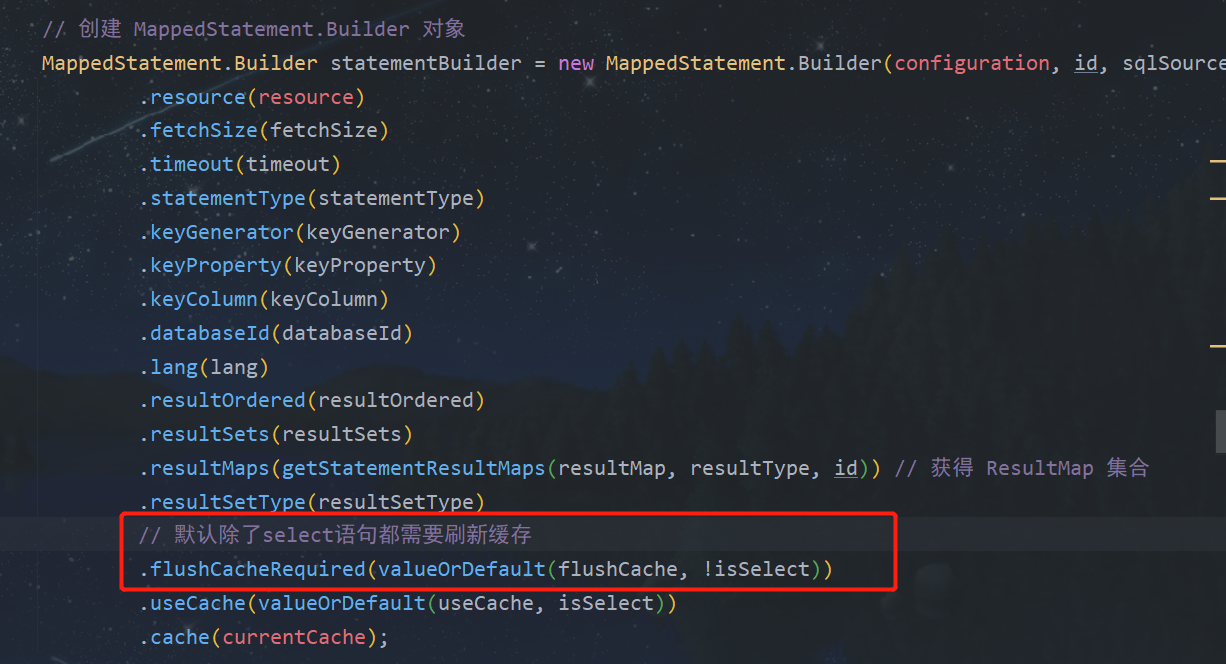
鉴于二级缓存存在如上两个问题,所以在项目中不建议使用 MyBatis 的二级缓存。