
 MyBatis复杂映射开发
# 1. XML模式复杂映射
# 1.1 查询模型
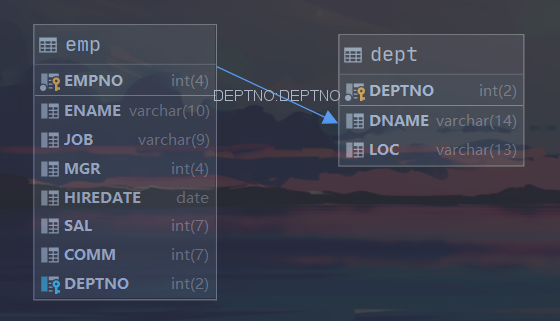
员工表(emp)和部门表(dept)的关系为:一个员工只属于一个部门,一个部门下有多个员工。
# 1.2 一对一查询
案例:一个员工只属于一个部门。
要求:根据员工编号查询员工信息,并查询员工关联的部门信息。
对应的查询语句为:SELECT e.*,d.* FROM dept d inner join emp e on d.DEPTNO = e.DEPTNO where e.EMPNO=?;
创建Emp实体和Dept实体:
public class Emp {
    private Integer empno;
    private String ename;
    private String job;
    private Integer mgr;
    private Date hiredate;
    private Double sal;
    private Double comm;
    private Integer deptno;
    // 存储部门信息
    private Dept dept;
    // getter seter...
}

public class Dept {
    private Integer deptno;

    private String dname;

    private String loc;
    // getter seter...
}
2
3
4
5
6
7
8
9
10
11
12
13
14
15
16
17
18
19
20
21
22
Dao实现类中添加对应的方法:
public interface IEmpDao {
    Emp findEmpAndDeptById(Integer empno);
}
2
3
EmpMapper.xml中添加配置:
<resultMap id="empDeptMap" type="emp">
    <!--empno对应数据字段名,property对应实体类属性名-->
    <result column="empno" property="empno"></result>
    <result column="ename" property="ename"></result>
    <result column="job" property="job"></result>
    <result column="mgr" property="mgr"></result>
    <result column="hiredate" property="hiredate"></result>
    <result column="sal" property="sal"></result>
    <result column="comm" property="comm"></result>
    <result column="deptno" property="deptno"></result>
    <!--association配置一对一映射关系,property对应实体类属性名,javaType对应属性类全限定名-->
    <association property="dept" javaType="dept">
        <result column="deptno" property="deptno"></result>
        <result column="dname" property="dname"></result>
        <result column="loc" property="loc"></result>
    </association>
</resultMap>

<!--resultMap对应上面配置的resultMap的id属性-->
<select id="findEmpAndDeptById" parameterType="integer" resultMap="empDeptMap">
    SELECT e.*,d.* FROM emp e LEFT JOIN dept d ON e.DEPTNO=d.DEPTNO
    <where>
        e.EMPNO = #{adc}
    </where>
</select>
2
3
4
5
6
7
8
9
10
11
12
13
14
15
16
17
18
19
20
21
22
23
24
25
association 标签是配置一对一映射的关系,内部配置Dept的属性值。
测试代码:
@Test
public void testFindEmpAndDeptById() throws Exception{
    InputStream resourceAsStream = Resources.getResourceAsStream("SqlMapConfig.xml");
    SqlSessionFactory sqlSessionFactory = new SqlSessionFactoryBuilder().build(resourceAsStream);
    SqlSession sqlSession = sqlSessionFactory.openSession();
    IEmpDao empDao = sqlSession.getMapper(IEmpDao.class);

    Emp emp = empDao.findEmpAndDeptById(7839);
    System.out.println(emp);
    sqlSession.close();
}
2
3
4
5
6
7
8
9
10
11
# 1.3 一对多查询
案例:一个部门下有多个员工信息。
要求:根据部门编号查询部门信息,并查询该部门下所有员工信息。
对应的查询语句为:SELECT e.*,d.* FROM emp e LEFT JOIN dept d ON e.DEPTNO=d.DEPTNO WHERE e.DEPTNO=?;
Emp实体和Dept实体上面我们已经创建过了,但由于需要返回员工信息,所以我们在Dept实体中增加字段:
public class Dept {
    private Integer deptno;

    private String dname;

    private String loc;
    // 存储员工信息的集合
    private List<Emp> empList;
    // getter seter...
}
2
3
4
5
6
7
8
9
10
Dao实现类中添加对应的方法:
public interface IEmpDao {
    Dept findDeptById(Integer deptno);
}
2
3
EmpMapper.xml中添加配置:
<resultMap id="deptEmpMap" type="dept">
    <result property="deptno" column="dno"></result>
    <result property="dname" column="dname"></result>
    <result property="loc" column="loc"></result>
    <!--collection配置一对多的映射关系,ofType对应集合泛型类型的全限定名-->
    <collection property="empList" ofType="emp">
        <result column="empno" property="empno"></result>
        <result column="ename" property="ename"></result>
        <result column="job" property="job"></result>
        <result column="mgr" property="mgr"></result>
        <result column="hiredate" property="hiredate"></result>
        <result column="sal" property="sal"></result>
        <result column="comm" property="comm"></result>
        <result column="deptno" property="deptno"></result>
    </collection>
</resultMap>
<select id="findDeptById" parameterType="integer" resultMap="deptEmpMap">
    SELECT e.*,d.deptno as dno,d.dname,d.loc FROM dept d left join emp e on d.DEPTNO = e.DEPTNO
    <where>
        d.DEPTNO = #{deptno}
    </where>
</select>
2
3
4
5
6
7
8
9
10
11
12
13
14
15
16
17
18
19
20
21
22
collection 标签是配置一对多映射的关系,内部配置Dept的属性值。
# 1.3 多对多查询
多对多查询可以看作是多个一对多查询,配置方式和一对多查询是相同的,只是sql语句的不同而已,在此不做赘述。
# 2. Mybatis注解开发
# 2.1 MyBatis的常用注解
这几年来注解开发越来越流行,Mybatis也可以使用注解开发方式,这样我们就可以减少编写Mapper
映射文件了。我们先围绕一些基本的CRUD来学习,再学习复杂映射多表操作:
- @Insert:实现新增
- @Update:实现更新
- @Delete:实现删除
- @Select:实现查询
- @Result:实现结果集封装
- @Results:可以与@Result一起使用,封装多个结果集
- @One:实现一对一结果集封装
- @Many:实现一对多结果集封装
# 2.2 MyBatis的增删改查
首先定义接口信息,并添加相应的注解:
public interface EmpMapper {

    /**
     * 根据主键查询
     */
    @Select("select * from emp where empno = #{empno}")
    Emp findById(Integer empno);

    /**
     * 查询所有
     */
    @Select("select * from emp")
    List<Emp> findAll();

    /**
     * 新增
     */
    @Insert("insert into emp values (#{empno},#{ename},#{job},#{mgr},#{hiredate},#{sal},#{comm},#{deptno})")
    void insert(Emp emp);

    /**
     * 修改
     */
    @Update("update emp set ename = #{ename} where empno = #{empno}")
    void update(Emp emp);

    /**
     * 删除
     */
    @Delete("delete from emp where empno = #{empno}")
    void delete(Integer empno);
}
2
3
4
5
6
7
8
9
10
11
12
13
14
15
16
17
18
19
20
21
22
23
24
25
26
27
28
29
30
31
32
对于注解的查询操作是不需要Mapper.xml配置文件的,因为sql的配置和结果映射都通过注解实现了
修改MyBatis的核心配置文件,我们使用了注解替代的映射文件,所以我们只需要加载使用了注解的Mapper接口即可:
<mappers>
    <mapper class="com.hukai.demo.mapper.EmpMapper"></mapper>
</mappers>
2
3
或者指定扫描包含映射关系的接口所在的包也可以:
<mappers>
    <package name="com.hukai.demo.mapper"/>
</mappers>
2
3
编写测试类:
public class EmpMapperTest {

    private SqlSession sqlSession;

    private EmpMapper empMapper;

    @Before
    public void before() throws IOException{
        InputStream resourceAsStream = Resources.getResourceAsStream("SqlMapConfig.xml");
        SqlSessionFactory sqlSessionFactory = new SqlSessionFactoryBuilder().build(resourceAsStream);
        sqlSession = sqlSessionFactory.openSession();
        empMapper = sqlSession.getMapper(EmpMapper.class);
    }

    @After
    public void after() {
        sqlSession.commit();
        sqlSession.close();
    }

    @Test
    public void testFindById(){
        Emp emp = empMapper.findById(7844);
        System.out.println(emp);
    }

    @Test
    public void testFindAll() {
        List<Emp> empList = empMapper.findAll();
        empList.forEach(System.out::println);
    }

    @Test
    public void testInsert() {
        Emp emp = new Emp();
        emp.setEmpno(7888);
        emp.setEname("hukai");
        emp.setJob("MANAGER");
        emp.setMgr(7839);
        emp.setHiredate(new Date());
        emp.setSal(8888D);
        emp.setDeptno(10);
        empMapper.insert(emp);
    }

    @Test
    public void testUpdate() {
        Emp emp = new Emp();
        emp.setEmpno(7888);
        emp.setEname("HUKAI");
        empMapper.update(emp);
    }

    @Test
    public void testDelete() {
        empMapper.delete(7888);
    }
}
2
3
4
5
6
7
8
9
10
11
12
13
14
15
16
17
18
19
20
21
22
23
24
25
26
27
28
29
30
31
32
33
34
35
36
37
38
39
40
41
42
43
44
45
46
47
48
49
50
51
52
53
54
55
56
57
58
就是这么简单。
# 2.3 MyBatis的注解实现复杂映射开发
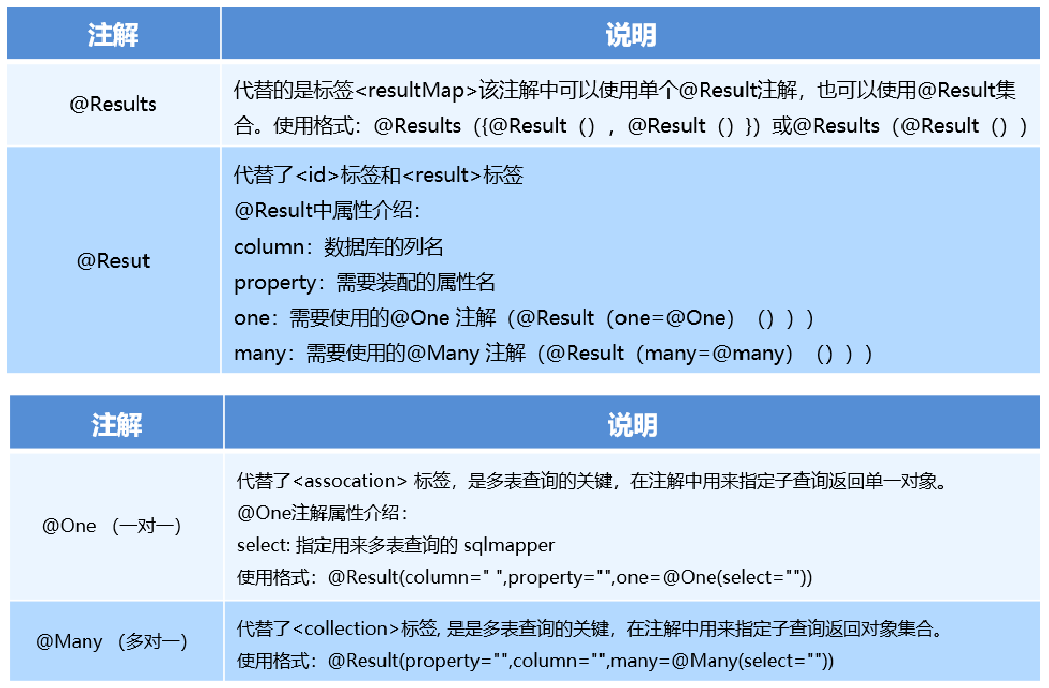
实现复杂关系映射之前我们可以在映射文件中通过配置来实现,使用注解开发后,我们可以使用
@Results注解,@Result注解,@One注解,@Many注解组合完成复杂关系的配置。
# 2.3.1 一对一查询
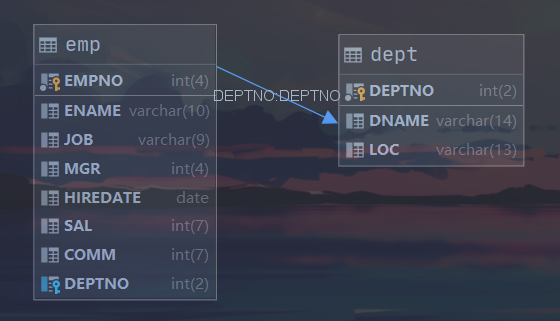
查询模型继续使用上面的员工表(emp)与部门表(dept)
在映射文件中我们查询一对一的思路是通过连接查询将两张表的记录同时查出来,然后封装进结果集中。而使用注解实现一对一查询需要转换思路:先将主表中的数据查询出来,然后根据主键值去查从表的外键字段,再将两个查询结果封装到同一个结果集中。
案例:一个员工只属于一个部门。
要求:根据员工编号查询员工信息,并查询员工关联的部门信息。
对应的查询语句:
select * from emp where EMPNO = ?
select * from dept where DEPTNO = '查询出员工的部门编号'
Emp和Dept的实体类我们之前已经建好了,不需要在做修改了,接下来编写Mapper接口:
public interface EmpMapper {
    @Results({
            @Result(property = "empno",column = "empno"),
            @Result(property = "ename",column = "ename"),
            @Result(property = "job",column = "job"),
            @Result(property = "mgr",column = "mgr"),
            @Result(property = "hiredate",column = "hiredate"),
            @Result(property = "sal",column = "sal"),
            @Result(property = "comm",column = "comm"),
            @Result(property = "deptno",column = "deptno"),
            @Result(property = "dept",column = "deptno",javaType = Dept.class,
                    one = @One(select = "com.hukai.demo.mapper.DeptMapper.findById")),
    })
    @Select("SELECT * FROM emp where EMPNO = #{empno}")
    Emp findEmpAndDeptById(Integer empno);
}

public interface DeptMapper {

    @Select("select * from dept where deptno = #{deptno}")
    Dept findById(Integer deptno);
}
2
3
4
5
6
7
8
9
10
11
12
13
14
15
16
17
18
19
20
21
22
执行过程为:
- 执行
@Select标签的sql语句 - 执行
@Results标签的语句封装@Select的查询结果 - 封装结果的时候有一个属性是dept,内部的one属性中
@one注解关联到了另外一个查询结果。所以就会调用DeptMapper中的findById方法,并将column 中配置的字段的值作为查询参数,然后将结果封装到dept这个属性中。
测试代码:
@Test
public void testFindEmpAndDeptById(){
    Emp emp = empMapper.findEmpAndDeptById(7788);
    System.out.println(emp);
    System.out.println(emp.getDept());
}
2
3
4
5
6

# 2.3.2 一对多查询
在映射文件中我们查询一对多的思路是通过连接查询将两张表的记录同时查出来,然后封装进结果集中。而使用注解实现一对多查询同需要样转换思路:先将主表中的数据查询出来,然后根据主表记录中的外键信息查询从表的数据,然后将两条查询记录封装进一个结果集中
案例:一个部门下有多个员工信息。
要求:查询所有部门信息,并查询部门下所有员工信息。
对应的查询语句为:
select * from dept
select * from emp where DEPTNO = ?
Emp和Dept的实体类我们之前已经建好了,不需要在做修改了,接下来编写Mapper接口:
public interface DeptMapper {

    @Results({
            @Result(property = "deptno",column = "deptno"),
            @Result(property = "dname",column = "dname"),
            @Result(property = "loc",column = "loc"),
            @Result(property = "empList",column ="deptno",javaType = List.class,many = @Many(select = "com.hukai.demo.mapper.EmpMapper.findByDeptno"))
    })
    @Select("select * from dept")
    List<Dept> findAllDeptAndEmp();
}

public interface EmpMapper {
    @Select("select * from emp where deptno = #{deptno}")
    List<Emp> findByDeptno(Integer deptno);
}
2
3
4
5
6
7
8
9
10
11
12
13
14
15
16
执行过程为:
- 执行
@Select标签的sql语句 - 执行
@Results标签的语句封装@Select的查询结果 - 封装结果的时候有一个属性是empList,内部的many属性中
@many注解关联到了另外一个查询结果。所以就会调用EmpMapper中的findByDeptno方法,并将column中配置的字段的值作为查询参数,然后将结果封装到empList这个属性中。
多对多查询与一对多查询类似,在此不做赘述。
# 2.4 注解的动态SQL
如果想在注解的映射器接口中使用动态SQL,那么可以使用script元素.
MyBatis提供的动态Sql标签在注解模式中也是一样适用,但是写法和刚才的一对一、一对多、多对多 的查询有所差异。作用和效果是一样的。所以这里只给出一个案例即可:
@Update({"<script>",
  "update Author",
  "  <set>",
  "    <if test='username != null'>username=#{username},</if>",
  "    <if test='password != null'>password=#{password},</if>",
  "    <if test='email != null'>email=#{email},</if>",
  "    <if test='bio != null'>bio=#{bio}</if>",
  "  </set>",
  "where id=#{id}",
  "</script>"})
void updateAuthorValues(Author author);
2
3
4
5
6
7
8
9
10
11